Transform how your team proofs PDFs

Ziflow brings review, annotation, and approval for PDFs into one place, so you can move every file forward faster.

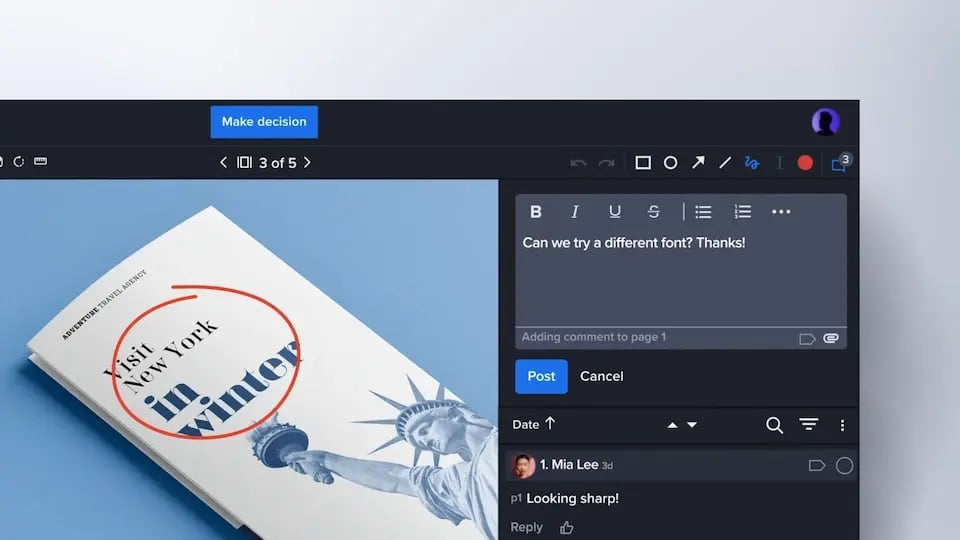
Accurate annotations and collaborative discussion for PDF reviews

Discussion tools help your team stay accountable and on the same page during asset reviews.

Posting a comment in a Ziflow proof viewer user interface

All of your creative, one platform

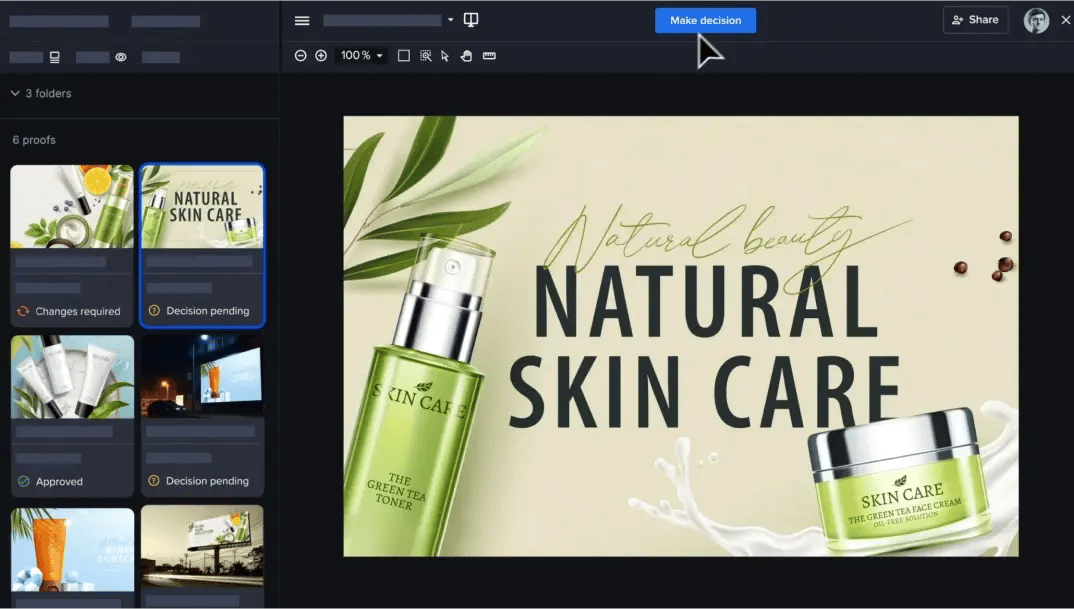
Review creative of all types—from video and image files to websites and PSDs—on one powerful platform.

Enterprise - Campaign-level reviews with Ziflow gallery view layout

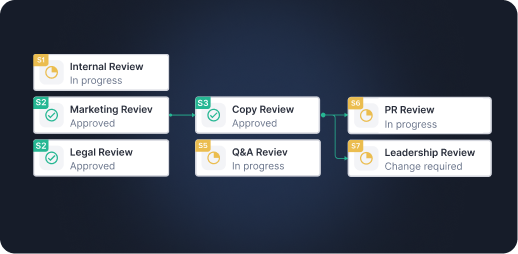
Automated review workflows for compliance

For highly regulated PDFs, create multi-stage review workflows with executive signoff and checklists that ensure compliance. For simpler projects, workflows can be as simple as a single-stage approval.

Multi-stage approval workflows boxes connected
FEATURES

Everything you need to proof a PDF, start to finish

Marking up PDFs isn’t hard. Getting all of your stakeholders to sign off on it in a timely, organized manner is where proofing software makes the difference. Here’s what Ziflow brings to every PDF review.

Precise annotation and markup

Pin comments to exact locations, draw with rectangles, arrows, and freehand tools, and annotate text directly: highlight, replace, delete, or insert. Reviewers can reply in threaded discussions, so decisions get made where the feedback lives.

Version comparison

Upload a new version and it inherits the previous round’s workflow and reviewers automatically. Compare versions side by side, down to the pixel, to confirm every fix actually landed before anyone signs off.

Automated review workflows

Route PDFs through sequential or parallel stages (creative, brand, legal) without forwarding a single email. Workflow templates set up your stages, reviewers, and notifications in one click, and deadline reminders chase the stragglers for you.

Decisions and approvals

Reviewers make a clear call. Choose Approved, Approved with changes, or Changes required. Ziflow calculates the final status automatically, and for regulated content, you can add checklists, decision reasons, and electronic signatures.

Accurate PDF rendering

Ziflow’s processing engine converts even massive PDFs into fast-loading proofs with accurate color, transparency, overprint, and font rendering, benchmarked against the Ghent Output Suite and ECI Altona Test Suite.

Import Acrobat comments

Already collected feedback in Adobe Acrobat? Import those comments straight into Ziflow so every annotation lives in one centralized review, not half here and half in an email attachment.

ONE FILE TYPE, EVERY ASSET

One file type with a hundred jobs

"PDF" doesn’t really tell you what’s inside the file. You could be looking at a 200-page catalog headed to press or a one-page sales sheet headed to an inbox. Ziflow proofs them all accurately, quickly, and in one place. PDFs on Ziflow show up as:

Print collateral

Brochures, flyers, posters, direct mail, and magazine layouts, where color accuracy and overprint handling decide whether the press run matches the approval.

Packaging and labels

Dielines, artwork, and label copy that need precise markup and multi-stage sign-off before anything gets manufactured.

Sales and marketing documents

Pitch decks, sales sheets, one-pagers, and proposals that live and die on screen, and still need every price and claim checked.

Long-form content

Ebooks, whitepapers, reports, and catalogs, where parallel page processing means a 200-page document is ready for review as fast as a 2-page one.

Design exports

Layouts exported from InDesign, Illustrator, or Photoshop for stakeholder review, with fonts, transparency, and color rendered as designed.

Regulated and legal documents

Disclosures, compliance materials, and legal copy that demand required reviewers, checklists, and a complete audit trail behind every decision.

Get Started page testimonial section background lolipops decorative lines
Tery Ann C Sales Operations & Support at Yello Media Group - Get Started Customer testimonial thumbnail

yello media group company logo

"We no longer depend on emails to get approval on content or for any kind of feedback. Everything is now on one platform!"

Terry Ann C.

Sales Operations & Support at Yello Media Group

Ariel B Creative Strategist at Overstock - customer testimony Get Started thumbnail

overstock company logo-1

"The review system is seamless. Its workflow creation is easy to create and use."

Ariel B.

Creative Strategist at Overstock

Ben T VP of Operations at Jellyfish - customer testimony Get Started thumbnail

jellyfish company logo

"The Ziflow team is excellent to work with, quick to respond to new feature requests and the product is very robust."

Ben T.

VP of Operations at Jellyfish.

Alan T, CMO of MAC group - customer testimony Get Started thumbnail

Macgroup company logo

"Before Ziflow, we lost countless hours chasing after people. Now we have all that time to put back into actual marketing products."

Alan T.

CMO of MAC group

Luke Dennis, Head of Film at Linney - customer testimony Get Started thumbnail

Linney vector logo-1

"Our speed to market has been massively improved by this platform. Relationships have been built as the result of being able to interact directly with clients on creative."

Luke Dennis

Head of Film at Linney

Thunder icon with a shield

REVIEWAI

Let AI take the first pass at your PDF reviews

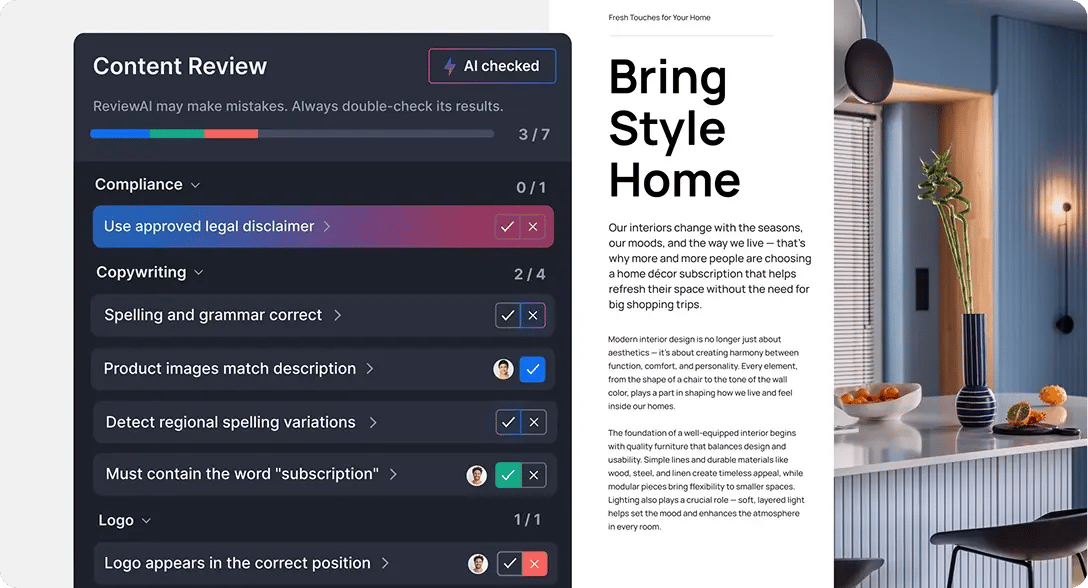
A big chunk of PDF review is mundane checking. Is the disclaimer there? Does every page match the checklist? With ReviewAI, Ziflow runs those checks automatically, flagging what passes and what doesn’t against your pre-set criteria before your reviewers open the proof.


Reviewers verify every AI suggestion before anything moves forward, so repetitive scanning gets faster while the judgment calls—brand feel, visual accuracy, and things that look wrong—stay human.

ReviewAI for checklists feature displayed in Ziflow sidebar-1
ReviewAI homepage decorative lines

Frequently asked questions

How do you choose the best PDF proofing software?

Judge it on five things. Rendering accuracy: does the proof faithfully reproduce color, transparency, overprint, and fonts, or are you reviewing an approximation? (Ziflow benchmarks its PDF processing against the Ghent Output Suite and ECI Altona Test Suite.) Annotation depth: pinned comments, drawing tools, and text-level markup, not just sticky notes. Workflow automation: can it route a PDF through multi-stage review without manual hand-offs? Fit with your stack: integrations with the project management, storage, and creative tools you already use. And scalability: security, permissions, and audit trails that hold up as more teams pile on. Then trial it with a real project; a week with your actual files beats any feature checklist.

How is Ziflow different from marking up PDFs in Adobe Acrobat or email?

Acrobat and email can collect comments; they just can’t run a review. Feedback ends up scattered across attachments and reply-alls, nobody knows which version is current, and "approved" is whatever the last email said. Ziflow centralizes everything with one proof, every reviewer’s markup in one threaded discussion, automatic version control, workflow routing, and a recorded decision from every stakeholder. And if some reviewers still work in Acrobat, you can import their comments directly into Ziflow, so their feedback joins the same centralized review instead of living in a separate file.

Does Ziflow support print proofing and color accuracy?

Yes. Ziflow’s PDF processing engine is built for print-grade accuracy: correct color reproduction, overprint, transparency handling, and ICC support, tested against the Ghent Output Suite and ECI Altona Test Suite, the two industry-standard benchmarks for PDF processing. Reviewers can also view color separations to check individual plates before a file goes to press. Accurate proofs mean the overprint mistake gets caught in review, not after the print run.

What annotation and markup tools does Ziflow offer?

Reviewers can pin comments to exact locations on the page, draw with rectangles, arrows, and freehand tools, and annotate text directly: highlight, replace, delete, or insert. Comments support threaded replies and attachments, so the discussion (and the decision) happens right on the proof. Every annotation is tied to the precise element it refers to, which is the difference between "fix the thing on page 3" and feedback someone can actually act on.

Can I automate multi-stage review and routing?

Yes, that’s Ziflow’s home turf. Build sequential or parallel review stages (creative, then brand, then legal), set a stage to start only when the previous one is approved, and decide whether every reviewer must weigh in or one decision moves things forward. Workflow templates apply your whole setup (stages, reviewers, notifications) in one click, and automated deadline reminders do the chasing so you don’t have to.

Does Ziflow support real-time collaboration and version comparison?

Yes. Reviewers work on the same proof simultaneously, seeing each other’s comments and replying in threads as the discussion unfolds, which is how debates get settled in minutes instead of over a week of email. For versions: upload a new one and it inherits the previous round’s workflow and reviewers automatically, and anyone can compare versions side by side, down to the pixel, to confirm the fixes landed.

How does Ziflow handle audit trails and approval records for compliance?

Every comment, version, decision, and reviewer action is logged automatically, giving you a complete, time-stamped record of who approved what and when. For regulated content, you can require decision reasons, add electronic signatures, and attach checklists that must be completed before an asset moves forward. Enterprise accounts keep lifetime historical data with detailed activity and access logs, and Ziflow is SOC 2 and ISO/IEC 27001 certified and GDPR compliant, with documentation available in the Ziflow Trust Center.

How do I migrate from my current proofing tool or from email-based review?

Start with a free trial and run one real project through it; most teams find that a single review cycle makes the case. From there, Ziflow’s onboarding ranges from guided setup to full-service implementation with custom training, and workflow templates let you rebuild your existing review process (or finally fix it) in minutes. Reviewers don’t need to install anything, external clients can review without a paid seat, and Acrobat comments can be imported so in-flight feedback comes with you. Ziflow Academy adds free, self-paced training for getting the whole team up to speed.

What integrations does Ziflow offer?

Ziflow offers native integrations with monday.com, Asana, Jira, Slack, Microsoft Teams, Dropbox, Google Drive, and SharePoint, plus plugins for Adobe Creative Cloud apps and Final Cut Pro. For everything else, Ziflow Connect lets you build automation flows with webhooks, and the Ziflow REST API supports fully custom integrations. Your PDFs can enter Ziflow from the tools your team already works in, and status updates flow back the moment decisions are made.

Single lolipop background

Start proofing PDFs in minutes

Upload a PDF, invite your reviewers, and watch the email chains die off. There’s no software for your reviewers to install.

Start free trial Get a demo
(function (c, p, d, u, id, i) { id = ''; // Optional Custom ID for user in your system u = 'https://tracking.g2crowd.com/attribution_tracking/conversions/' + c + '.js?p=' + encodeURI(p) + '&e=' + id; i = document.createElement('script'); i.type = 'application/javascript'; i.defer = true; i.src = u; d.getElementsByTagName('head')[0].appendChild(i); }("4187", document.location.href, document));