What we'll cover
Table of contents
- Ziflow vs. design apps: Why creative teams still need dedicated proofing software
- Where design apps fall short in creative review and approval
- Better together: Integrate Adobe Creative Suite with Ziflow
- What Ziflow customers are saying
- FAQs about Ziflow vs. design apps for online proofing
- Final Verdict: Ziflow vs. design apps for creative review and approval
Ziflow vs. design apps: Why creative teams still need dedicated proofing software
For many creative teams, tools like Figma, Canva, Miro, and Mural have become the go-to tools for design teams. And by default, they have also become default places for giving feedback as well. It makes sense: they’re already where the work happens. You can drop a comment, tag a teammate, maybe even reply back and forth. For small teams or quick visual tweaks, that might feel like enough.
But as creative projects scale, spanning formats, stakeholders, and channels, the cracks begin to show. Comments get buried. Version control goes out the window. Feedback becomes fragmented across files, apps, and email threads. These tools were built for designing, not managing review and approval at scale.
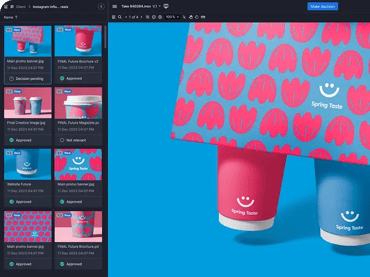
That’s where Ziflow comes in. Ziflow complements these design apps by providing structure, visibility, and control to your creative feedback process without asking you to stop using the tools you love.
Where design apps fall short in creative review and approval
Limited file and media support
Figma, Canva, Miro, and Mural excel at specific types of content — typically static visuals or web prototypes. But most creative campaigns span far more than that: PDFs, HTML5 ads, videos, live websites, 3D packaging files, and more.
Ziflow fixes this by allowing teams to review over 1,200 file types in one place, including exports from your favorite design tools, without needing to switch platforms or cobble together separate review flows.
No real workflow automation
Design apps offer no way to manage multi-stage reviews. You can’t build approval sequences, assign deadlines, or automatically route work to legal, brand, or external stakeholders.
In Ziflow, you can set up automated review workflows with conditional logic, parallel stages, and SLA-based triggers that route the right creative to the right people at the right time.
Fragmented feedback and version chaos
Design apps often treat comments as annotations tied to a specific canvas, not a versioned asset. This makes it hard to compare revisions, track what changed, or resolve conflicting feedback across versions.
Ziflow stacks versions automatically with side-by-side comparisons. Keep all comments, decisions, and change history in one place even if assets are updated externally in Figma or Canva.
Lack of compliance, governance, or audit trails
If you need to meet regulatory requirements or track who approved what, when, and why, design tools fall short. There are no audit logs, no role-based reviewer permissions, and no e-signature support.
Ziflow’s built-in SOC 2 compliance, approval decision tracking, and secure e-signatures ensure your creative review process meets enterprise standards.
No campaign-level visibility
You can’t review an entire campaign in one flow across these tools. Figma shows you one frame at a time. Canva is document-based. Miro and Mural are designed for brainstorming, not approval.
Bring together all assets (web banners, videos, packaging, emails, and landing pages) into a single proof in Ziflow. Get feedback and sign-off across your entire campaign, in one view.
Better together: Integrate Adobe Creative Suite with Ziflow
For many teams, Adobe Creative Cloud is the platform for all creative projects. Ziflow offers native plugins for Photoshop, Illustrator, InDesign, Premiere Pro, and After Effects, so designers and editors can send files to review, respond to comments, and upload new versions without ever leaving their Adobe apps.
What you get when you connect Adobe and Ziflow:
- One-click proof creation from Adobe apps
- Inline access to feedback inside your creative tools
- Automatic version tracking and comparison
- Fewer emails, exports, and upload steps
Ziflow doesn’t replace Adobe, it completes it. Creative teams get to stay focused on the work, while project managers, clients, and legal reviewers get the structure, visibility, and accountability they need.
What Ziflow customers are saying
“Canva makes it difficult to control versions and compare them. Ziflow works on multiple file types like digital, web page, video, documents, images, banners, audio, GIFs, and others. Ziflow is one-stop shop for gaining content feedback and approval process. Plus it integrates with many tools.”
“There is pretty much everything to love about the Ziflow software. There are several things that I am super impressed about with this platform. It is very user friendly, I appreciate that comments made on the pdf files that are being quality checked can be viewed and addressed instantly on the InDesign software, I also enjoy using the options of viewing version 1 and version 2 side by side so that the quality checker can readily identify if all fixes indicated on a particular page has been addressed.”
“Ziflow offers a more user-friendly interface and a more comprehensive range of document review and collaboration features than some alternatives. Ziflow's integrations with other popular tools, such as Adobe Creative Cloud, Asana, and Slack, make it easier to streamline workflows and collaborate more effectively with teams.”
FAQs about Ziflow vs. design apps for online proofing
Can I use Ziflow with Figma, Canva, or Miro?
Ziflow works alongside all major design apps. Simply export your designs and upload them to Ziflow, or use our integrations to automate this step.
Is Ziflow a design tool like Figma or Canva?
No. Ziflow is not for designing, it’s for managing creative feedback and approval once a design is ready for review.
Figma comments live in the design canvas and lack version tracking or auditability. Ziflow provides versioned, centralized feedback with automated workflows, reviewer permissions, and full audit trails.
Does Ziflow integrate with my Adobe Creative Cloud design tools?
Yes, with Ziflow's plugin for Adobe Creative Cloud, you can access review and approval features directly inside the Creative Suite apps Photoshop, After Effects, Premier Pro, InDesign and Illustrator.
Final Verdict: Ziflow vs. design apps for creative review and approval
If your team uses Figma, Canva, Miro, or Mural, you’re already ahead of the game when it comes to collaborative design. But design is only one part of the creative process. Review and approval is where things often break down.
Ziflow gives you the missing infrastructure to scale creative collaboration, reduce confusion, and accelerate delivery without changing how your team designs.

With a track record that spans media giants like WarnerMedia, Viacom, and Google, Aaron's expertise shines through in multi-million dollar projects across various mediums, from traditional television to the dynamic realm of YouTube.