There’s a special feature email has that no other asset can claim: there’s no undo. You can fix a broken web page in minutes or pull a print run before it ships, but the second an email flies off, it's in every inbox on the list. The only correction you have left is a follow-up that politely announces your mistake to everyone who hadn't noticed.
So you'd think email would be the most carefully reviewed thing a marketing team produces. It's usually the least. It feels routine, so it gets a glance instead of a review, and the numbers show what that costs: Litmus looked at millions of tested emails and found 96% contained content errors and 75% had broken links. Yeah, we were surprised, too. The errors doing the damage aren't typos, either. They're the wrong link, the personalization token that never merged, the version that went out before anyone actually signed off. And it was all preventable!
What we'll cover
Table of contents
What is email proofing?
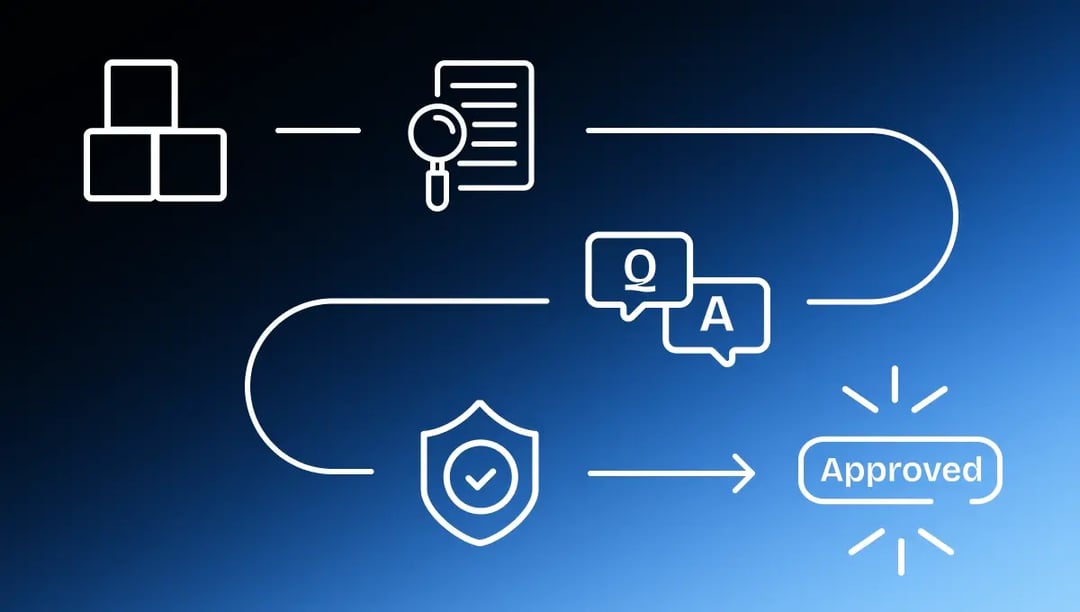
Email proofing is the structured review and approval process that takes an email from draft to send-ready. Reviewers check copy, links, design, personalization, and compliance on a specific version, everyone in their lane: build QA, copy, brand, legal. One person signs off, on the record, before anybody touches the send button.
Why email review isn’t that easy
There’s no undo
Every other asset gives you a little grace. You can swap a file or fix a page, but email gives you nothing. The moment it sends, the mistake is in every inbox, and your only correction is a follow-up that helpfully announces the error to everyone who hadn’t noticed yet.
Links and tokens fail silently
A broken link looks completely fine in the design. A personalization token that didn’t merge looks fine right up until it doesn’t. A wrong UTM looks fine forever, because nobody ever sees it. Unfortunately, these aren’t the kind of errors you catch by glancing at the email and nodding. Somebody has to click every link and test the merge, on purpose, before the send.
It renders many, many different ways
Outlook, Gmail, Apple Mail, mobile, desktop, light mode, dark mode. Litmus counts more than 300,000 ways an email can render across clients and environments. So the email that looks pristine in your inbox can fall apart in somebody else’s. This one’s a legitimate problem, and we’ll get to how you solve it.
Approvals that aren’t real approvals
A thumbs-up in Slack or Google Docs before a 200,000-person send is not a sign-off you can stand behind. Without a recorded approval on the specific version that goes out, it’s hard to prove who cleared it.
The four review stages every email needs
The biggest mistake teams make is treating email like a quick glance instead of a real review, then letting everyone eyeball it at the same time. You need sequential stages with real gates.
Stage 1: Build
Assemble the email into something that represents the final product (ie. layout, images, copy in place, links working).
Stage 2: Copy and brand review
Copy, subject line, preheader, brand consistency. Catch the placeholder subject line here, not in the inbox where 200,000 people can enjoy it.
Stage 3: QA. Now someone on your team checks it.
Click every link, test the merge with real data. Look at the UTMs, the alt text, the load size, etc.
Stage 4: Legal and compliance
Claims, pricing, offers, regulated content, plus the basics: a working unsubscribe and whatever CAN-SPAM or your local equivalent requires. You’re giving this important step its own gate.
Stage 5: Final approval before send
One last confirmation that the approved version is the one queued up, with sign-off recorded. The gap between “looks ready” and “gone forever” is about two inches wide. This is your last chance.
Email proofing checklist: what to check before you hit send
Run this at build QA and revisit the relevant bits at each stage. Reviewing an email means clicking every link and testing the merge, not admiring the design. There’s no undo, so there’s no skimming.
How Ziflow fits into email review
Ziflow is the review, markup, approval, and sign-off layer for your email creative. It’s not an inbox-rendering tool, and it won’t show you how your email looks in Outlook versus Gmail versus Apple Mail. For cross-client rendering you want a dedicated testing tool like Litmus or Email on Acid. What Ziflow handles is the part that’s usually a scattered mess: getting the email reviewed, agreed on, and actually signed off.
Here’s how that works. Bring the email into Ziflow as a static image or PDF of the design, as HTML5 in a ZIP, or as raw HTML (which Ziflow treats as a web page proof), and reviewers leave comments pinned to the exact spot, on one version, in one place. No more reply-all with your notes. Build a Workflow Template (Settings, Proofing Settings, Workflow Templates) so Build QA, Copy, Brand, and Legal run in order, each stage starting when the one before it is Approved. New version comes in, Auto Compare highlights what changed, and previous comments show resolved or unresolved.
On Enterprise, hang a Checklist on the workflow for the silent killers that ruin your day: every link clicked and correct, personalization tokens tested, UTMs right, unsubscribe present, subject line and preheader final. Reviewers tick those off right where they comment, so the stuff that never shows up in the design gets verified by an actual human instead of assumed. And when the email’s cleared, sign-off is recorded as a decision tied to a version and a person, with an audit trail. Before a six-figure send, that’s exactly what you want sitting behind you.
So, our two cents: pair Ziflow with a rendering tool. The rendering tool tells you it looks right everywhere. Ziflow gets everyone to agree it is right, and puts the sign-off on record. Together, that’s a real QA process.
How to know your email is ready to send
An email is ready when every one of these is true.
- Every link has been clicked and confirmed to go to the right place
- Personalization tokens have been tested with real data, not assumed
- UTM parameters and tracking are correct
- Rendering has been checked across major clients and dark mode (in your rendering tool)
- Subject line, preheader, copy, and compliance elements are final and reviewed
- Sign-off is recorded on the specific version that’s queued to send
Miss one and it’s not ready. Nothing personal, that’s just the process standing between you and an apology email.
What we’ve seen at Ziflow
Teams that put a real review process around email stop sending the same unsendable errors. Your rendering tool catches how it looks. Your review process catches whether everyone agreed it was right and whether the send was genuinely cleared. Because you need both.
Build the process before the send
Email feels routine right up until the send you can’t take back. A consistent review process doesn’t slow you down so much as it prevents an early morning apology, and it means that when an email goes out you know everything worked. Build the checklist into your workflow, pair it with your rendering tool, and make it the standard.
See how email creative gets reviewed and approved in Ziflow at ziflow.com/demo.

With a track record that spans media giants like WarnerMedia, Viacom, and Google, Aaron's expertise shines through in multi-million dollar projects across various mediums, from traditional television to the dynamic realm of YouTube.