The artwork approval process in pharma is how a drug company reviews and approves packaging, labeling, and promotional materials before they go to print or go live.
Regulatory submission is separate from the artwork approval process; it happens earlier and produces the approved labeling text the artwork must match. The approval process also runs separately from pharmaceutical artwork management systems, which store files and route them to reviewers. Medical, legal, and regulatory (MLR) review is one stage inside this process, not a separate process.
Summary
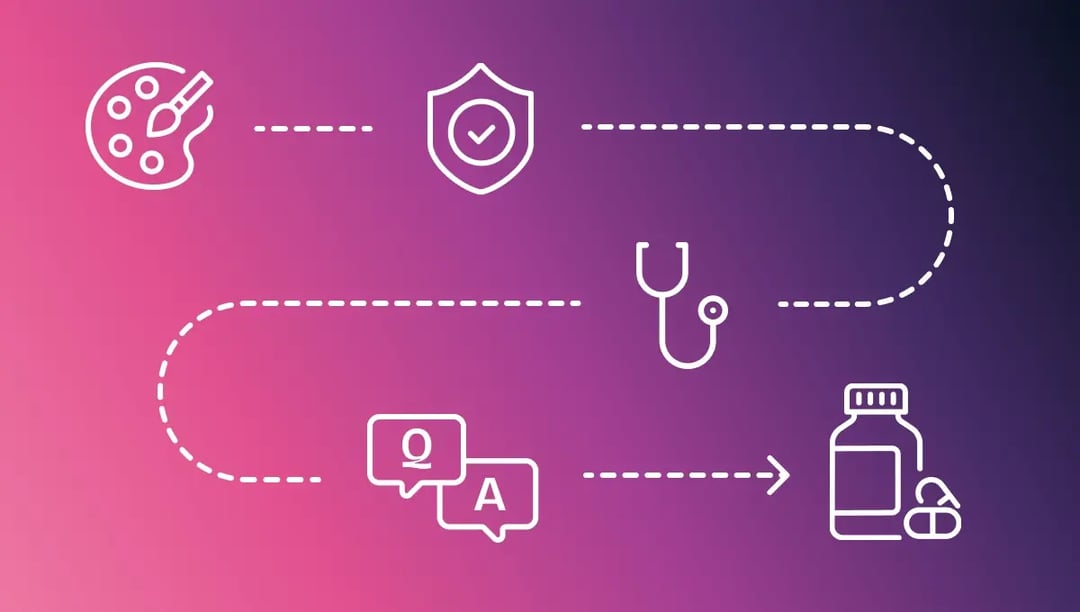
- The artwork approval process in pharma moves through four stages: brand review, MLR review, regulatory affairs approval, and final QA.
- Packaging artwork for cartons, labels, and leaflets often bypasses brand and MLR review because it uses text from the drug's approved labeling.
- Drug companies must submit prescription drug ads and promotional labeling to the FDA on Form FDA 2253 when they first use them.
- An approver makes a binding, recorded decision. A reviewer only leaves comments.
- A retrospective of FDA drug recalls from 2012 to 2023 attributes about 8% of them to labeling problems.
- Approval software records who approved which version. Barcode and braille checks need separate inspection software.
What we'll cover
Table of contents
- Regulatory requirements that shape pharma artwork approval
- The 4 stages of the pharma artwork approval process
- What separates an approver from a reviewer
- Why email-based artwork review fails
- How workflow automation and audit trails close each gap
- Where the approval workflow ends, and packaging verification begins
- How Everyday Health Group moves MLR review into defined stages
- Building an artwork approval process auditors can follow
- Frequently asked questions about the pharma artwork approval process
Regulatory requirements that shape pharma artwork approval
Pharma artwork approval requires more sign-offs than other creative approval because regulators control two things: what a label or ad may say, and how the company documents its approval. Four sets of requirements drive most of the extra work.
Labeling rules differ by market
In the US, FDA labeling rules sit in 21 CFR Part 201, and prescription drug advertising rules sit in Part 202. In the EU, Directive 2001/83/EC sets label and leaflet content, and the EMA's Quality Review of Documents (QRD) templates set the wording and order for centrally authorized products. The UK's MHRA and Health Canada set their own requirements.
A pack approved for one market can fail in another over warning placement, a missing local statement, or a translation error. Companies usually keep a separate artwork version for each market or language, so changes to shared content must reach every version.
Promotional material has its own submission and enforcement path
A company must submit each prescription drug ad and piece of promotional labeling to the FDA on Form FDA 2253 when it first uses it, under 21 CFR 314.81(b)(3)(i). The version the FDA holds has to match the version the company's approvers signed off on.
The FDA's Office of Prescription Drug Promotion (OPDP) issues untitled letters, or warning letters for more serious violations, when it finds promotional claims false or misleading. A letter typically asks the company to stop using the material and list every other piece that makes the same claim. A team that can search its approved assets by claim can answer quickly. A team working from email has to rebuild the list first.
Approval records must meet electronic records rules
When a company signs FDA-required records electronically, such as label control records under 21 CFR Part 211, 21 CFR Part 11 applies. Each signature must show the signer's name, the date and time, and what the signature means, such as review or approval (§11.50). It must also be linked to its record so no one can copy it to another record (§11.70). The system needs audit trails that log who changed what and when (§11.10(e)).
EU GMP Annex 11 sets the equivalent rules for computerized systems used in EU manufacturing: each electronic signature must stay permanently linked to its record and include the date and time.
Label changes trigger artwork change control
When a new safety warning is approved or a regulation changes, the team must find every affected asset in every market, then revise, re-approve, and reprint it. This work is called artwork change control, and it starts with knowing which version is live in each market.
The 4 stages of the pharma artwork approval process
In the artwork approval process in pharma, a finished promotional asset passes through four stages in a set order. Regulatory affairs can only check labeling after MLR reviewers finalize the asset's claims.
Outside pharma, the general approval process has fewer required sign-offs.
|
Stage |
Who owns the decision |
What the stage evaluates |
What happens on rejection |
|
Brand review |
Marketing and the creative team |
Whether the asset meets brand and creative standards |
Returns to the design studio for revision |
|
MLR review |
Medical, Legal, and Regulatory reviewers |
Whether claims are accurate, supported by the approved label, and legally sound |
Returns with the claim changes needed before the next stage |
|
Regulatory affairs approval |
Regulatory Affairs |
Whether the asset meets labeling and submission rules in each market |
Returns to MLR or to design, depending on whether the defect is a claim or a layout |
|
Final QA |
Quality Assurance |
Whether the correct, approved version is ready for release |
Blocks release until the correct version is confirmed |
The four stages apply in full to promotional content. Packaging artwork for cartons, labels, and patient information leaflets often bypasses brand and MLR review because it derives its text from approved labeling and follows its own path to print.
Stage 1: Brand review
Marketing and creative teams own brand review. They check that the asset follows brand and creative standards before any compliance reviewer sees it.
If they reject it, they send the file back to the design studio. Because no compliance reviewer has seen the file yet, no one has to repeat a compliance review.
Stage 2: MLR review
Medical, legal, and regulatory reviewers decide whether every claim can stay in the asset. They check that each claim is accurate, supported by the approved label, and legally sound.
If they reject it, they send the file back with the required claim changes. Regulatory affairs only receives the asset after MLR reviewers approve those changes.
Stage 3: Regulatory affairs approval
Regulatory affairs reviewers confirm that the asset meets the regulator's labeling and submission requirements, including the local rules in each market.
If the problem is a claim, they send the file back to MLR. If the problem is layout or placement, they send it back to design.
Stage 4: Final QA
Quality Assurance (QA) performs the last check before release. QA reviewers verify that the artwork matches the approved version and confirm that the asset complies with current Good Manufacturing Practices.
Earlier reviewers should catch version mismatches during revision. If they skip that check, QA reviewers become the only people left to catch the problem, and they know the least about earlier changes.
How packaging artwork moves through approval
The text on cartons, container labels, and patient information leaflets comes from the labeling the regulator approved for that product and market. Regulatory affairs keeps that approved wording as the master text, and regulatory affairs reviewers check every packaging component against it before it goes to print.
- Artwork request. A product, packaging, or regulatory team requests a new product, a new market, or a labeling change and names the master text version the artwork must match.
- Design. The packaging design team or agency builds the artwork and places the master text without rewording it.
- Text proofreading. Regulatory affairs reviewers proofread the artwork word for word against the master text, in every language the pack carries.
- QA approval. Quality Assurance approves the artwork version that goes to the printer.
- Printer proof approval. The printer returns a proof made from the approved file, and reviewers compare it with the approved artwork before the print run. In Ziflow, a team can upload the printer's proof as a new version and use Auto Compare to highlight visual differences for a reviewer to check.
- Release and receipt. QA releases the artwork for printing and files the approved version with its approval record. Under 21 CFR 211.122, the company must examine printed packaging materials on receipt before use and must destroy obsolete and outdated labels and packaging materials.
What separates an approver from a reviewer
In the pharma artwork approval process, an approver formally approves or rejects the asset and records their name and a timestamp. A reviewer only comments, and a comment does not move the asset forward.
If a team lets reviewers block an asset, any reviewer with an open comment can hold up the asset, even after the approver has cleared it.
Part 11 requires each electronic signature to be linked to the record it signs, so no one can copy the signature onto another record. An approval record must therefore show which actions were binding decisions and which were comments.
Ziflow's multi-stage workflows let a team assign a different reviewer group to each stage. In the workflow template, the team also sets whether a stage advances after a single approval or only after all reviewers approve.
Why email-based artwork review fails
Teams that run pharma artwork approval through email and shared drives face three problems. Even careful people run into them because of how the process works.
A retrospective analysis of FDA recalls from 2012 to 2023 attributes about 8% of recalls to labeling problems, such as label mix-ups and cross-labeling, where a product carries another product's label.
A separate, smaller study of 195 drug recalls from 2017 to 2019 traced 14.9% of that sample to labeling issues.
1. No single retrievable record of who approved what
When a team collects approvals by email, the approvals end up in several people's mailboxes. Some of those mailboxes belong to people who have since left the company.
Months later, an auditor or regulator may ask for that record, and the team has to piece it together from old mailboxes.
Approvals given outside email make the problem worse. When someone writes "looks good" in Slack or approves verbally on a call, no system records that approval.
A team can test this with one question. Can it produce an unambiguous, timestamped record for a disputed version in under five minutes?
2. Version confusion puts approvals on the wrong file
Without version control, two reviewers can review different files while believing they are reviewing the same one. A reviewer might open a translated version and mistake it for the latest file.
In another case, a designer revises the file after some reviewers approve it. Those reviewers never see the change, so their approval no longer matches the printed asset.
3. Missing records and version errors create audit risk
The FDA recall classification places minor labeling errors and defective packaging as Class III. Class III covers problems unlikely to harm patients but still requiring a recall.
If a team cannot show which version its approvers signed off on, it cannot show how a labeling error reached print.
With Ziflow's FDA-compliant electronic signatures turned on, each approver re-enters their login credentials to sign an approval decision. Ziflow's activity log records every signed decision on the proof.
How workflow automation and audit trails close each gap
In Ziflow, a proof is the review copy of an asset. Ziflow enforces the stage order, so a proof cannot reach release until MLR and regulatory affairs reviewers approve it.
|
Problem |
Mechanism |
Evidence it produces |
|
No retrievable approval record |
An audit trail that logs every comment, version, and formal approval action |
A timestamped entry naming the user who acted and the version they acted on |
|
Version confusion |
A fixed stage order. A rejected proof goes back only to the stage that needs the fix, and approved stages stay approved |
A single proof carrying its full version history, with side-by-side comparison between rounds and each approval tied to a version |
|
Outside reviewers struggle to get access |
Reviewer access by link, with no account required and no paid seat |
A logged decision from an outside legal, regulatory, or agency reviewer who joined only their own stage |
For teams evaluating access control, Ziflow's enterprise permissions let an administrator grant each reviewer group access only to the stages and assets covered by its role. Administrators can also separate reviewers who can only comment from decision-makers.
Ziflow's guide to the creative approval audit trail lists the six data points an auditor expects in an approval record and explains how each regulatory framework defines documentation.
Where the approval workflow ends, and packaging verification begins
For a pharma team, the approval workflow provides a fixed stage order for packaging artwork and a record of who approved which version and when.
Ziflow provides this review and approval workflow. Ziflow does not verify packaging content.
Specialists check barcodes, braille, and print specifications as a separate discipline.
They compare the final artwork against the specification character by character, using inspection software built for the task.
An approval log cannot show whether a barcode scans. A barcode scanner cannot show whether the regulatory approver signed off on the version that went to print.
How Everyday Health Group moves MLR review into defined stages
Everyday Health Group publishes healthcare journalism and handles pharmaceutical advertising that needs medical, legal, and regulatory review.
Before the team adopted Ziflow, reviews ran on paper. Staff put printed materials in a folder called a job jacket and left it on a reviewer's desk.
The team now moves every asset that needs MLR review through defined review stages in Ziflow.
The team tracks its work in Asana. As a proof moves between stages, Ziflow updates and reassigns the matching Asana task, so the team can follow each asset without opening Ziflow.
Teams in other regulated categories, including consumer packaged goods, use the same staged approach.
Ogee is a certified organic brand whose packaging needs regulatory review before printing. Its team routes regulatory and formulation review separately from creative review, so each group sees only its own part.
Building an artwork approval process auditors can follow
A team can test its pharma artwork approval process with two questions:
- Does every required approver act inside a system that logs the action with their identity and a timestamp?
- Can the team retrieve a version's full approval history in minutes?
Ziflow enforces approval-stage order and records each review decision with a timestamp.
Get a demo to see a multi-stage pharma workflow set up from brand review through final QA.
Frequently asked questions about the pharma artwork approval process
What are the guidelines for artwork in the pharmaceutical industry?
FDA labeling rules set what must appear on packaging and labeling, such as dosage instructions. They also limit how companies can make promotional claims.
Regulators outside the US, such as the European Medicines Agency, apply their own labeling rules.
What are the 21 CFR rules for pharmaceutical artwork?
Title 21 of the Code of Federal Regulations (21 CFR) holds the FDA's drug rules. Four sets of rules matter most for artwork.
Part 201 sets what prescription drug labeling must contain. Section 314.81 requires companies to submit promotional labeling and ads on Form FDA 2253.
Parts 210 and 211 set the cGMP rules, including how a company controls and checks labels during packaging. Part 11 sets the standard for electronic records and signatures used to document approvals.
What is the artwork approval process in pharma?
The artwork approval process in pharma is the sequence of reviews an asset goes through from the artwork request to release.
What are the steps involved in the pharmaceutical approval process?
The phrase "pharmaceutical approval process" refers to two distinct processes. Drug approval is the process a company follows to get a regulator's approval before it can sell a drug.
Artwork and promotional approval is the internal review each asset clears before print or publication, with its own owners, timeline, and regulations.
How should teams manage artwork versions and revisions?
Keep one proof per asset, and upload each revision to that same proof. This keeps every round of review in one version history.
Creating a new proof each round splits the comment history and prior approvals across several proofs. Translated versions should stay in the same proof history too.
Ziflow attaches each new version to the same proof, so reviewers can compare rounds side by side and confirm changes against the approved master text.
How is approval documentation different from packaging verification?
Approval documentation records who approved which version, and when. Packaging verification inspects the artwork itself, checking barcodes, braille, and print specifications with separate inspection software.

With a track record that spans media giants like WarnerMedia, Viacom, and Google, Aaron's expertise shines through in multi-million dollar projects across various mediums, from traditional television to the dynamic realm of YouTube.