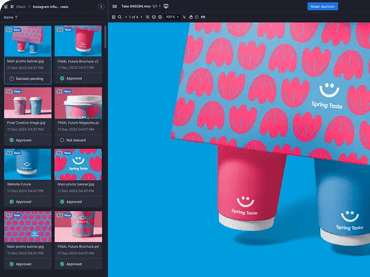
If your creative projects include more than just video—and let’s be honest, most do—then choosing the right proofing tool becomes a lot more complicated. Frame.io shines for video teams, especially those embedded in Adobe’s post-production ecosystem. But when a campaign also includes web pages, PDFs, images, and animations that require coordinated approvals across teams, Frame.io may start to show its limitations.
Ziflow was built to handle whatever creative you throw at it. From multi-asset campaign reviews and automated workflows to AI-powered proofing and compliance-ready audit trails, Ziflow gives creative teams a single platform to manage feedback across every format—video included. In this post, we’ll compare Ziflow and Frame.io head-to-head so you can decide which platform fits your team’s full creative workflow.
What we'll cover
Table of contents
TL;DR: Why Ziflow wins
- All-in-one asset support: Ziflow handles videos and 1200+ other asset types—live and staged websites, images, PDFs, and more—making it ideal for full campaign reviews.
- Enterprise-grade workflows: Ziflow offers automated, multi-stage workflows, version control, and audit trails so you can streamline approvals at scale.
- AI-powered proofing: Ziflow’s ReviewAI checks proofs against your brand, spelling, and compliance criteria and automatically suggests comments and markups, so reviewers spend less time hunting for errors.
- Transparent pricing: No hidden fees for collaborators. Ziflow’s pricing avoids the surprise bills many teams now face with Frame.io.
Compare features: Ziflow vs. Frame.io
|
Frame.io
 /5 (80 reviews) |
Reviews (Capterra) |  /5 (417 reviews) |
|
Offers frame-accurate video commenting and annotations, but lacks advanced markup for other formats. No measurement tools.
 |
Review and Markup |
Advanced markup tools including threaded comments, @mentions, frame-specific video review, safe-zone overlays, and version comparison—built to handle every asset type. |
|
Focused on video content; does not support combined views for multi-format campaigns.
 |
Multi-Asset Campaign Reviews |
Review any mix of assets in a campaign, including videos, images, websites, and more, in a single proof or individually. |
|
No AI-powered review on any asset type. AI is limited to search and video transcription.
 |
AI Review |
ReviewAI checks proofs against your custom checklists, suggests comments and markups, and provides a pass/fail result with rationale. Improve the accuracy of each check with prompt testing and reliability scores. |
|
Offers version stacking for most file types, but only offers side-by-side comparison for images and PDFs of the same size. Older versions aren't auto-locked.
|
Version Management |
Automatically tracks all versions with visual comparisons and full audit history. Prevents outdated feedback with auto-locking of older versions. |
|
Built for video reviews. Supports common file types including images, audio, PDF, and documents. Live website URL review not supported.
|
Media Types |
Supports 1,200+ file types including video, images, live and staged websites, audio, documents, HTML5, and more. |
|
No built-in approval routing (e.g., sequential stages, conditional logic, or deadlines). Teams must advance reviews manually.
|
Workflows & Review Stages |
Advanced workflow automation with parallel/sequential stages, logic-based routing, and SLA-based triggers. Scales easily across departments and projects. |
|
No public uptime metrics are shared. Published SLA covers support response times, not platform availability.
|
Reliability - Product Uptime |
Delivers 99.99% uptime with a global infrastructure and published SLAs. Designed for high availability across large teams. |
|
No native intake forms. External contributors need a paid seat to upload files, which can get expensive quickly at scale.
|
Intake Forms |
Custom-branded intake forms route uploaded files directly into workflows with required metadata. External and internal users supported. |
|
No built-in analytics or reporting tools.
|
Reporting |
Built-in dashboard for review analytics and usage insights, plus data export for custom analytics. |
|
No e-signatures or approval audit trail. SOC 2 Type 2, ISO 27001, and TPN Gold Shield certified, with Enterprise watermarking, SSO, and DRM.
|
Security & Compliance |
Authenticated e-signatures, credentials verified at signing, with a full audit trail on every proof. SOC 2 and ISO 27001 certified. Used by pharma, medical device and food teams to support their FDA 21 CFR Part 11 compliance. |
|
No native embedded PM integrations outside Adobe Workfront. Other PM tools can connect through Zapier or custom API.
|
PM Integrations |
Connects natively to monday.com, ClickUp, Asana, Jira, Wrike, Slack, Teams, and Dropbox, with a direct API for custom integrations. Embedded in Monday.com and ClickUp, so proofs are created and reviewed without switching tabs. |
|
Deep Adobe connections, plus Final Cut Pro, Camera to Cloud, and a public API. Integrations center on video and photo production.
|
Creative Integrations |
Connects natively to Adobe Creative Cloud, Figma, and DaVinci Resolve, plus a direct API for custom integrations. |
|
Native panels for Premiere Pro and After Effects, plus Photoshop and Lightroom connections. No native plugins for InDesign or Illustrator.
|
Adobe Plugins |
Native plugins for Adobe Creative Cloud suite—InDesign, Photoshop, Illustrator, Premiere Pro, and After Effects—plus Final Cut Pro. Allows creatives to stay inside the tools they use. |
|
No checklist functionality.
|
Checklists |
Offers customizable checklists to help reviewers stay consistent and compliant. Assign up to 10 checklists per stage. Offers AI-powered checklists with pass/fail rationale. |
Workflow & automation
Frame.io covers the basics of getting a proof in front of the right reviewers in the right order, like multi-stage approvals. What it doesn't offer is logic that moves work forward on its own: no conditional routing, no SLA-based triggers, and older versions aren't auto-locked when a new one arrives. Ziflow gives you advanced creative workflow automation with sequential and parallel stages, decision logic, and deadline triggers so campaigns keep moving without someone chasing every approval.
Pricing
Frame.io users are often frustrated by billing confusion and hidden upgrade triggers—where even external contributors need a paid seat just to upload files. Ziflow provides transparent, predictable pricing with no surprise charges for collaborators, no storage penalties, and absolutely no forced upgrades.
AI-powered review
Frame.io’s AI features focus on media search and video transcription, not on speeding up the review process. Ziflow’s ReviewAI fills that gap: it automatically checks each proof against your custom checklists and suggests comments and markups for reviewers to confirm. Teams can build checklists around brand guidelines, spelling and grammar, and compliance requirements, so reviewers spend less time hunting for errors and more time making judgment calls.
Collaboration experience
Both platforms support commenting and annotations. Frame.io's frame-accurate commenting is strong for video, but markup for other formats is limited and there are no measurement tools. Ziflow enables deeper collaboration across every asset type with threaded replies, @mentions, safe-zone overlays, side-by-side version comparison, and a complete decision log, helping cross-functional teams stay aligned.
Collaboration also depends on who can contribute. In Frame.io, anyone who needs to upload files must be added as a paid user, so costs climb as more freelancers, agencies, and partners supply assets. Ziflow’s custom-branded intake forms let internal and external contributors submit files, website URLs, or text without a paid seat, then route each submission straight into the right review workflow with the required metadata attached.
Compliance, security, & control
Frame.io holds strong protections for securing media, including SOC 2 Type 2, ISO 27001, and enterprise features in higher tiers. What it doesn’t offer is a way to prove who approved what: there are no e-signatures, and its activity logs are admin-only and kept for just 30 days before moving to cold storage. Ziflow captures authenticated e-signatures, verifies credentials at signing, and keeps a full audit trail on every proof. Ziflow is also SOC 2 and ISO 27001 certified, and pharma, medical device, and food teams use it to support their FDA 21 CFR Part 11 compliance.
Integration ecosystem
Frame.io integrates deeply with Adobe tools and select video production apps, but its integrations center on video and photo production. Outside of Adobe Workfront, there are no native project management integrations, so connecting to other tools means relying on Zapier or a custom build. Ziflow integrates natively with Adobe Creative Cloud, Figma, and DaVinci Resolve, and with monday.com, ClickUp, Asana, Jira, Wrike, Slack, Teams, and Dropbox. It's embedded directly in monday.com and ClickUp, so teams create and review proofs without switching tabs.
Scalability & support
Frame.io is a great fit for post-production teams but doesn’t scale easily across complex workflows or multi-team environments. Ziflow is built to support global enterprise teams with high volumes of content, customizable workflows, and 24/7 support. Whether you're managing 10 or 10,000 assets, Ziflow adapts to your needs.
What Ziflow customers who switched from Frame.io are saying
“I selected Ziflow over Frame.io because of the price. Ziflow has way more features for a fraction of the cost.”
“When using other software for reviewing projects, we have [used] Frame.io and Ziflow interchangeably. One thing I really like that Ziflow does over Frame.io is that it allows you to stack different versions on the project. Such as when you are making edits to a video you are able to stack the newest version on top of the older one and it is easier to compare the two.”
“Although some functionality in Frame IO is better for some file types, (particularly Broadcast data), Ziflow was a better all round tool for all Media types.”
Why switch to Ziflow?
Whether you're already using Frame.io or evaluating your first proofing platform, it's worth asking: What happens after the video is approved? For most creative teams, video is just one part of the campaign. There's also web, email, print, packaging, social, legal review, and more. And that’s where Frame.io starts to fall short.
Ziflow is purpose-built to handle everything your team creates, from live websites and PDFs to HTML5 ads and packaging files, all in one place. You still get powerful video review capabilities, plus automated workflows with logic-based routing, AI-powered review, full audit trails, and integrations with the tools your entire creative ops stack depends on.
For current Frame.io users, the switch to Ziflow means fewer tools, less manual coordination, and clearer visibility across every asset—not just video. And for teams exploring proofing software for the first time, Ziflow offers a future-proof foundation that scales as your projects and teams grow.
Ziflow vs. Frame.io FAQs
What is the difference between Ziflow and Frame.io?
Frame.io is a video-first review tool that integrates deeply with Adobe Premiere Pro, After Effects, and Final Cut Pro. Ziflow is a comprehensive online proofing platform that supports 1200+ creative formats, and adds logic-based workflow automation, AI-powered review, e-signatures, audit trails, and native integrations across your entire tech stack, not just Adobe.
Is Ziflow better than Frame.io for complex creative review workflows?
Yes, especially if your team works with more than just video. Frame.io is optimized for video post-production, while Ziflow supports full creative campaigns, including PDFs, web pages, HTML5, images, and more. Ziflow also offers automated workflows, intake forms, and advanced approval routing that Frame.io doesn’t.
Can Ziflow replace Frame.io for video review?
Yes, with added benefits. Ziflow supports frame-specific commenting and over 470 video formats, just like Frame.io. But it also lets you review video alongside images, websites, PDFs, and more, all in one platform with enterprise-ready automation and compliance controls.
Does Ziflow have better workflow automation than Frame.io?
Absolutely. Frame.io supports multi-stage approvals, but Ziflow goes further with conditional logic, dynamic routing, SLA-based triggers, and auto-locking of outdated versions. If you need to scale creative reviews across departments or clients, Ziflow is the stronger choice.
Does Frame.io support proofing for websites, PDFs, or HTML5?
Frame.io supports common file types, but its focus is video. Ziflow, by contrast, was built for every kind of creative project, with support for more than 1,200 file types, including live websites.
Does Ziflow integrate with Adobe Creative Cloud like Frame.io?
Yes, and with more of it. Ziflow's Adobe Creative Cloud integration includes native plugins for Photoshop, Illustrator, InDesign, Premiere Pro, and After Effects, plus Final Cut Pro. Frame.io offers native panels for Premiere Pro and After Effects and connections for Photoshop and Lightroom, but no native plugins for InDesign or Illustrator. Ziflow also integrates natively with Figma, DaVinci Resolve, monday.com, ClickUp, Asana, Slack, and more.
Does Frame.io have AI-powered review?
No. Frame.io's AI is limited to media search and video transcription, not on speeding up the review process. Ziflow's ReviewAI checks proofs against your custom checklists, like brand guidelines and compliance rules, suggests comments and markups, and gives a pass/fail result with rationale on every check. Your reviewers spend less time hunting for errors and more time making judgment calls.
Is Ziflow or Frame.io better for regulated industries?
Both platforms hold SOC 2 and ISO 27001 certifications. The difference is approval compliance: Frame.io has no e-signatures or approval audit trail. Ziflow captures authenticated e-signatures, verifies credentials at signing, and keeps a full audit trail on every proof, which is why pharma, medical device, and food teams use it to support FDA 21 CFR Part 11 compliance.
Final verdict: should you choose Ziflow or Frame.io?
If your team works mostly on video and is fully embedded in Adobe’s post-production ecosystem, Frame.io can get the job done. But for most creative teams, that’s not enough. Campaigns today span far more than video: web content, social ads, PDFs, packaging, HTML5, and more. Managing all that with a video-first tool creates silos, slows teams down, and increases the risk of missed feedback or compliance gaps.
Ziflow is the better choice for teams who need flexibility, scalability, and control. It supports every creative format, automates complex workflows, and provides the enterprise-grade features Frame.io lacks, like intake forms, AI-powered review, e-signatures, audit trails, and 24/7 global support.
Whether you're scaling a creative ops team or just tired of stitching together tools, Ziflow helps you streamline reviews across your entire content lifecycle—not just post-production.

With a track record that spans media giants like WarnerMedia, Viacom, and Google, Aaron's expertise shines through in multi-million dollar projects across various mediums, from traditional television to the dynamic realm of YouTube.