You know all too well that client feedback can absolutely make or break your creative projects. If you've ever spent hours digging through email chains trying to find that one comment, you know exactly what we're talking about. Ad hoc feedback processes have many up to their ears in scattered comments and conflicting opinions.
For marketing teams and agencies juggling multiple campaigns, things get even messier. Feedback floods in from emails, Slack messages, random meetings, and those dreaded "quick calls" that turn into hour-long discussions. Important comments disappear into the void, you're working on version 17 (or was it 18?), and that simple approval you needed last week somehow turns into a month-long saga.
Dedicated client feedback tools can turn this mess into something actually manageable. These platforms bring all your feedback into one place, automate the boring stuff, and give you the structure you need to deliver great work without losing your mind (or your deadlines).
What we'll cover
Table of contents
What are client feedback tools?
A client feedback tool is basically your project's command center for collecting and managing feedback on creative work. Think of it as the difference between having a conversation in a crowded room versus a focused meeting. These tools are built specifically for gathering input on designs, videos, documents, or websites in a way that actually makes sense.
Here's where people often get confused: client feedback tools and customer feedback software are totally different animals. Customer feedback software gathers those big-picture insights like surveys, NPS scores, and understanding how people feel about your brand overall. Client feedback tools are the workhorses of active projects. We mean visual annotations right on your designs, version control that saves your sanity, and approval workflows that keep things moving. One's for passive data collection, the other's for getting things done.
These tools are critical for creative teams, agencies, and marketing departments working with external clients on specific deliverables. Instead of getting vague emails saying "make it pop," you get specific comments pinned right to the problem area. You nix the guessing games and version confusion, and instead produce clear communication that keeps projects on track.
In short, they transform scattered feedback across emails, calls, and sticky notes into one organized system everyone can actually use.
Benefits of using a client project feedback tool
We’ve seen that teams using dedicated client project feedback tools report significant improvements in their workflows and client satisfaction.
Time savings hit you right away. No more digging through email threads trying to piece together feedback from three weeks ago. Everything lives in one spot, and automated reminders mean you're not the one constantly asking "Hey, did you get a chance to review this?" Plus, when clients can click directly on what needs changing instead of writing novels about "that blue thing in the corner," everyone wins.
Better collaboration changes the whole dynamic. When everyone can see each other's comments in real-time, you catch conflicting feedback early… before you've spent hours going in the wrong direction. Clear indicators show who needs to review what and when, so projects don't stall because someone didn't realize it was their turn. Clients love the transparency too; they can see their feedback being addressed without having to ask for constant updates.
Better results naturally follow when you've got your process dialed in. Clear deadlines, organized feedback rounds, and version control mean you're not accidentally working on outdated files (we've all been there). You get higher quality work delivered faster, with happier clients all around.
Fewer revisions lower everyone’s stress levels and budget. When you collect feedback in organized rounds instead of letting it trickle in over weeks, you can tackle everything at once. This prevents that awful scenario where you think you're done, only to get a whole new round of changes that send you back to the drawing board.
Key features in a client feedback tool
Choosing the right client feedback tool means knowing which features actually matter versus which ones just sound great in a sales pitch. After digging into what really moves the needle for creative teams, here are the eight features you can't live without.
1. Visual annotation and markup capabilities
You need contextual commenting that shows exactly what needs changing. Look for tools that let you highlight, draw shapes, or go freehand on all your file types (images, videos, PDFs, live websites). When feedback points to the exact pixel that needs work, there's no room for misinterpretation.
2. Version control and comparison tools
You need complete change tracking, side-by-side comparisons that show what actually changed, the ability to roll back when needed, and crystal-clear version numbering. When reviewers can see the evolution between versions, they give better, more focused feedback.
3. Workflow automation
Custom approval workflows route assets to the right people automatically, while status tracking shows you exactly where things are stuck. Automated reminders and deadline management keep everything on schedule without you playing traffic cop.
4. Security features
Role-based permissions mean people only see what they should, while encryption and audit trails keep the compliance folks happy. Look for SOC 2 Type II certification and GDPR compliance if you're working with bigger clients.
5. Integration capabilities
You want native connections to Adobe Creative Suite, your project management platform (Asana, Jira, whatever you use), Slack for notifications, and your cloud storage. The goal is seamless workflows, not constant app-switching.
6. Ease of use for non-technical clients
Guest access without creating accounts, interfaces that don't require a manual, mobile compatibility, and minimal learning curves mean your clients will actually use the tool instead of reverting to email.
7. Real-time collaboration features
Live commenting, support for multiple reviewers at once, instant notifications, and threaded discussions keep the momentum going.
8. Reporting and analytics
Project dashboards show status at a glance, performance metrics help spot bottlenecks, and historical data reveals patterns that help you build better workflows over time.
Top 6 client feedback tools
1. Ziflow: Best overall for creative teams
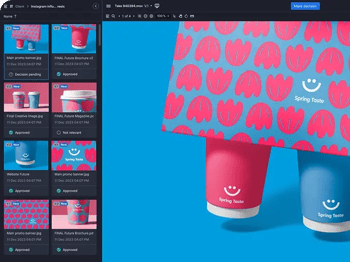
Ziflow takes the crown as the most comprehensive client feedback tool for marketing teams and agencies dealing with complex campaigns. It's built specifically for teams who need enterprise-level features without enterprise-level headaches.
Key features:
- Reviews 1,200+ file types (yes, including those obscure Adobe formats)
- ZiflowAI automates compliance checking and approval routing
- Unlimited workflow stages with parallel and sequential routing
- Pixel-level version comparison and overlay modes
- Native Adobe Creative Cloud plugins for seamless integration
- SOC 2 Type II and ISO 27001 certified security
Pros:
- Handles more file formats than any competitor
- AI features actually save time (not just buzzword fluff)
- Security that'll keep your IT team happy
- Scales from small teams to massive operations
- Batch review lets you approve entire campaigns at once
Cons:
- Takes time to master all the advanced features
- Might be overkill for simple projects
Best suited for: Marketing teams, creative agencies, and enterprises managing high-volume creative production with complex approval chains.
2. Usersnap: Best for product teams collecting client feedback
Usersnap bridges two worlds: it's part visual feedback tool, part user experience platform. Perfect for teams who need client collaboration tools that also capture real user insights.
Key features:
- Screenshot and screen recording with automatic metadata capture
- Usersnap Board gives clients a portal without logins
- In-app surveys with smart conditional logic
- Browser extension for feedback on any website
- 50+ integrations with dev and project tools
Pros:
- Super easy for non-technical clients to use
- Automatic technical metadata helps developers
- No login hassles for clients
- Great survey features for broader insights
Cons:
- Not as robust for traditional creative workflows
- Limited workflow automation
- They killed the free tier (RIP)
Best suited for: Product teams, web development agencies, and SaaS companies running client UAT testing and feedback collection.
3. BugHerd: Best for website bug tracking
BugHerd keeps things pretty simple. Just point, click, and your website feedback becomes an actionable task.
Key features:
- Point-and-click feedback directly on websites
- Automatic screenshot and technical metadata capture
- Built-in Kanban board for task management
- Pin-to-element tech keeps feedback contextual
- Zero client login requirements
Pros:
- Low learning curve
- Creates bug reports automatically with tech details
- Task management built right in
Cons:
- Website feedback only (no other file types)
- Basic workflow capabilities
- Not for general creative assets
Best suited for: Web developers, digital agencies, and QA teams focused exclusively on website projects and bug tracking.
4. Filestage: Works for smaller teams needing structured approvals
Filestage is suited for small to mid-sized teams that are starting to outgrow email-based feedback but don't need enterprise robustness. If you're managing multiple clients or projects simultaneously, this could be a decent fit.
Key features:
- Pre-built approval workflow templates
- Support for common creative file formats
- Side-by-side version comparison
- Guest reviewer access (no login required)
- Activity tracking and notifications
Pros:
- Quick setup with templates
- Intuitive interface for non-technical users
- Good for agencies with multiple clients
- Reasonable learning curve
Cons:
- Limited customization options
- Can feel restrictive as you scale
- Fewer integrations than enterprise tools
- Basic reporting capabilities
Best suited for: Small agencies juggling multiple clients, marketing teams in growing companies, and creative teams transitioning from email-based feedback to a proper review system.
5. Frame.io: Best for video collaboration
Now part of Adobe Creative Cloud, Frame.io is basically the standard for video reviews in the film industry. But for marketing teams / enterprise companies, this may not be the best fit. Not everyone is looking to be a Spielberg.
Key features:
- Frame-accurate time-coded comments
- Camera to Cloud direct upload
- 4K video playback and review
- Deep Adobe Premiere Pro integration
- Watermarking and session-based security
Pros:
- Film industry standard = clients aware of it
- Seamless Adobe workflow
- Camera to Cloud is a great feature
Cons:
- Pretty useless for non-video content
- Best value requires Adobe subscription
- Can overwhelm non-video folks
Best suited for: Video production teams, filmmakers, with video-heavy workflows.
6. Markup.io: Best for simple visual feedback
Markup.io keeps things dead simple. No bells, no whistles, just straightforward visual feedback that anyone can figure out in seconds.
Key features:
- Click-to-comment on websites and files
- Chrome extension for instant feedback
- Support for 30+ file types
- Unlimited users at flat rate
- Guest access without registration
Pros:
- Easy to use
- Set up in minutes
- Flat-rate pricing with unlimited users
- Great for quick website feedback
Cons:
- Basic workflow automation
- Limited features compared to others
- They axed the free plan (bummer)
- Minimal project management
Best suited for: Small creative teams, freelancers, and anyone who values simplicity over advanced features.
Choose the right client feedback tool for your team
The creative world has moved way beyond email chains and sticky notes. Today's client feedback tools can cut your revision cycles in half and give you back many hours every week. The trick is finding the one that fits your team like a glove.
If you're looking for the whole package — comprehensive features, enterprise-ready security, and the ability to handle whatever file format gets thrown at you — Ziflow is your best bet. Its AI-powered workflows and proven track record with complex campaigns make it the go-to choice for teams who take their creative operations seriously. Want to see what structured feedback can do for your workflow? Take a free trial and your creative outlook will get a lot sunnier.
Whether you're running global campaigns or smaller focused projects, the right feedback tool transforms foggy processes into clarity, turns chronic delays into on-time deliveries, and converts frustrated stakeholders into your biggest fans. Sure, it's an investment — but one that pays for itself in better efficiency, higher quality work, and a team that actually enjoys the review process

With a track record that spans media giants like WarnerMedia, Viacom, and Google, Aaron's expertise shines through in multi-million dollar projects across various mediums, from traditional television to the dynamic realm of YouTube.